
iMagic Hotel Reservation5.94 - Download
You'll be able to download in few seconds.
Publisher Description
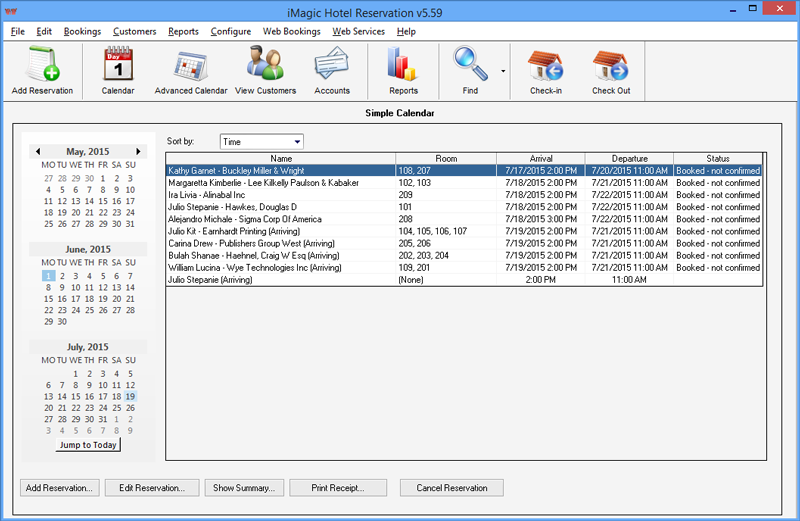
Anyone who manages a hotel will know, the unexpected can happen. Reservations can change, rooms can be double booked, and payments can be confused. iMagic makes sure this will never happen again.
iMagic is an easy to use hotel reservation system that allows you to simplify the whole process. Once installed, taking a reservation involved a 5-step process in which customer details are entered into the system. Everything else is taken care of.
iMagic allows you to easily allocate rooms, rearrange them, track charges and payments, make additions to the bill for money spent at the bar or restaurant, and much more. It also allows you to take web booking, extending your reach to a wider online market.
With the iMagic installed, you can also record and track customer information to improve their experience, analyze trends, and monitor the effectiveness of your promotions to increase returns.
Full of features, yet incredibly simple to use and inexpensive, the iMagic hotel management software is ideal for small hotels, bed and breakfasts, and guesthouses. Purchase yours today, and enjoy the immediate benefits to your business.
About iMagic Hotel Reservation
This PIMS & Calendars program is available in English. It was last updated on 29 September, 2026. iMagic Hotel Reservation is compatible with the following operating systems: Windows.
The company that develops iMagic Hotel Reservation is iMagic. The latest version released by its developer is 5.94.
The download we have available for iMagic Hotel Reservation has a file size of 18.9 MB. Just click the green Download button above to start the downloading process. The program is listed on our website since 2017-03-13 and was downloaded 0 times. We have already checked if the download link is safe, however for your own protection we recommend that you scan the downloaded software with your antivirus. Your antivirus may detect the iMagic Hotel Reservation as malware if the download link is broken.
How to install iMagic Hotel Reservation on your Windows device:
- Click on the Download button on our website. This will start the download from the website of the developer.
- Once the iMagic Hotel Reservation is downloaded click on it to start the setup process (assuming you are on a desktop computer).
- When the installation is finished you should be able to see and run the program.
Program Details
System requirements
Download information
Pricing
Version History
version 5.94
posted on 2017-03-13
November 2016 update for hotel management and reservations, new tax rate options, guest export, cleaning list to improve day to day work and more. iMagic Hotel Reservation - making day to day administration easy.
version 3.58
posted on 2005-12-07
Added new reporting system.
Disclaimer
External Download
We do not host iMagic Hotel Reservation on our servers. We did not scan it for viruses, adware, spyware or other type of malware. This app is hosted by the software publisher and passed their terms and conditions to be listed there. We recommend caution when installing it.
The external download link for iMagic Hotel Reservation is provided to you by apps112.com without any warranties, representations or guarantees of any kind, so access it at your own risk.
If you have questions regarding this particular app contact the publisher directly. For questions about the functionalities of apps112.com contact us.
